Denoising & Cleanup
Grain, compression artefacts and sensor noise are separated from genuine detail and removed, leaving clean surfaces that survive close inspection and zoom.
AI Creative Services
Supplier files, phone photographs and older archive images often arrive too small, too soft or too noisy for a modern store. Our pipeline rebuilds clarity and resolution, then a retoucher checks every product detail before the file goes back to work.
The Problem
Every catalogue carries images that nearly work: a supplier shot at the wrong size, a phone photograph from a busy warehouse, a discontinued line that exists only in an old archive. Reshooting is not always possible, and publishing them as they are makes the whole store look tired.
AI image enhancement rebuilds what the file is missing — resolution, fine detail, clean edges — while removing the noise and softness that made it unusable. The honest limit matters too: enhancement reconstructs plausible detail, so our retouchers verify the result against the real product. Labels stay accurate, textures stay truthful, and nothing is invented on the product itself.
We restore the photograph you already have, and a retoucher answers for every detail in it.
What You Get
Grain, compression artefacts and sensor noise are separated from genuine detail and removed, leaving clean surfaces that survive close inspection and zoom.
Soft focus and mild motion blur are corrected where the underlying detail allows, recovering edges, weave, stitching and surface texture.
Small files are rebuilt at larger dimensions for modern storefronts, zoom views and marketplace requirements that older images cannot meet.
Images are upscaled and prepared for print and display use, including 300 DPI preparation where the source file can honestly support it.
Flat, dark or colour-shifted captures are balanced after enhancement, so rescued images sit naturally beside your current studio photography.
Mixed batches from suppliers and archives are brought to one consistent standard, file by file, instead of being published in uneven quality.
Demonstration
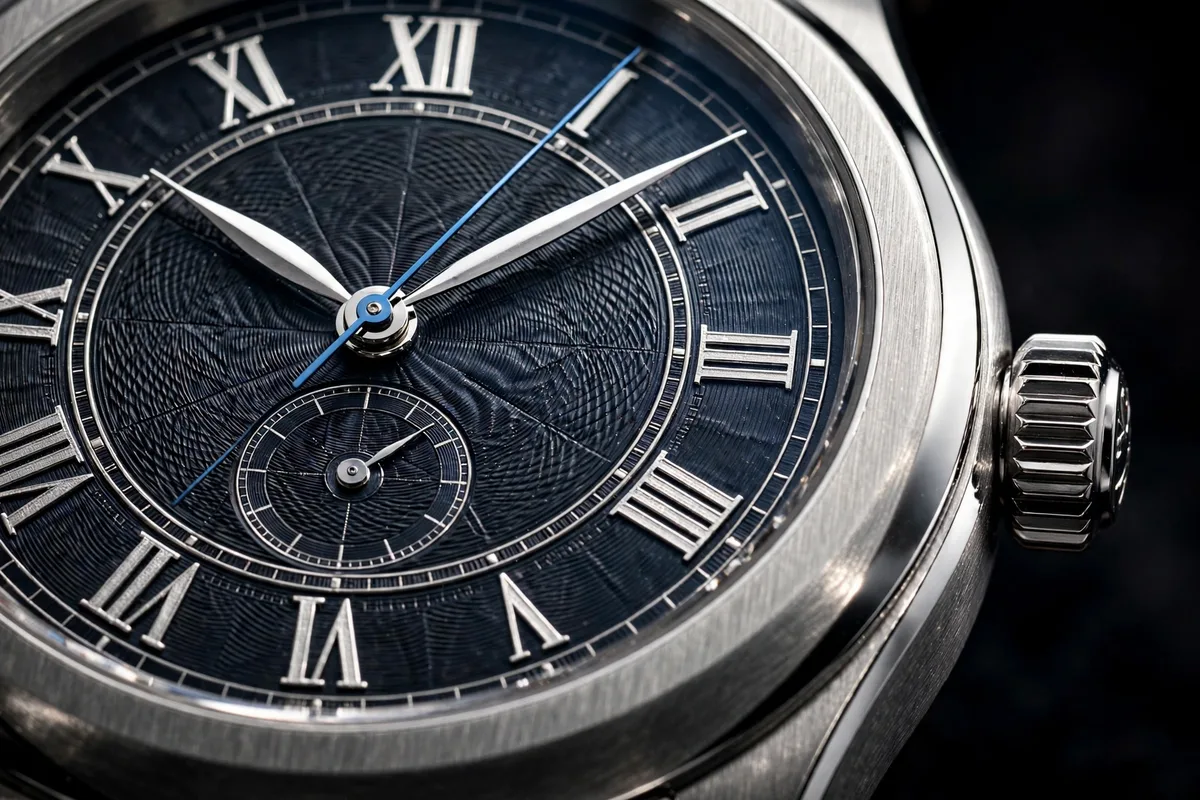
The pair below shows the service on a demonstration watch photograph: the low-resolution frame on the left, the restored and upscaled result on the right.
 BeforeAfter
Workflow
We review your files, group them by condition and source, and flag anything that cannot be rebuilt honestly before work begins.
The AI pass removes noise, recovers detail and rebuilds resolution, tuned per group so similar images receive a consistent treatment.
Colour, exposure and sharpness are balanced against your existing catalogue photography, so restored files belong in the same set.
A retoucher verifies labels, logos and textures against the originals at full size, then approves the files for delivery.
Who It Is For
This service suits teams whose image library grew faster than their photography budget: brands inheriting supplier files, stores migrating older catalogues to larger storefront layouts, and sellers whose best product shots exist only at yesterday's resolution.
Deliverables
| Deliverable | Formats | Notes |
|---|---|---|
| Enhanced masters | TIFF, PNG | Full-resolution restored files, kept as your new working masters. |
| Store-ready images | JPEG, WebP | Sized and compressed for product pages and zoom views. |
| Print-ready files | TIFF, PDF-ready JPEG | Prepared at 300 DPI where the source honestly supports print size. |
| Matched batches | Per your specification | Supplier and archive groups balanced to your catalogue standard. |
| Condition notes | Document | A short record of files that could not be fully restored, and why. |
Questions
Most real photographs benefit: supplier packshots, phone photographs from a warehouse or showroom, older archive files, marketplace images supplied at low resolution, and scans of printed material. If a file is too damaged to rebuild honestly, we will tell you before any work begins rather than deliver a polished guess.
Ordinary sharpening only increases contrast along edges that already exist, which quickly looks harsh. AI enhancement analyses the whole frame, separates genuine detail from noise, and reconstructs plausible texture at a larger size. A retoucher then checks the result against the original, so edges look natural instead of processed.
In many cases, yes. Upscaling rebuilds resolution while denoising and detail recovery keep the file clean at larger sizes, and we prepare output for print workflows, including 300 DPI preparation where the source allows it. We will advise honestly when a source file cannot support the size you need.
No. Protecting product truth is the point of the human pass. Retouchers compare labels, logos, stitching, materials and colour against your original file and correct any reconstructed area that drifts. Enhancement restores how clearly a product is seen; it never redesigns what the product actually is.
Send the largest, least-compressed version you have: the original camera file, the supplier's master, or the earliest export you can find. Avoid screenshots and images copied from social platforms, which discard detail. If you are unsure which version is best, send what you have and we will advise.
Yes. Once the first files are approved, we record the enhancement settings, colour balance and output specification used, then apply the same standard across the batch. Enhanced supplier or archive images sit comfortably beside your existing studio photography instead of looking like they came from somewhere else.
Choose a small set of your most difficult files, the ones you currently cannot use, and send them through the free trial of up to 5 images. We enhance them to the standard described here and return them for your review, with notes on what larger batches would involve.
See the full AI production programme: generation, editing, backgrounds, video and automation, all finished under retoucher supervision.
Explore the hub Related ServiceWhen a real photograph needs more than restoration — extended scenes, replaced objects and new crops, finished by hand.
See generative editingFree Trial
Start with a free trial of up to 5 images: pick the most difficult files in your catalogue and judge the restoration on your own products.